Device Support
XClock supports various data acquisition (DAQ) devices for clock generation. This page provides device-specific information, wiring diagrams, and configuration details.
Supported Devices
LabJack T4
The LabJack T4 is the primary supported device for XClock.
Specifications:
Base clock frequency: 80 MHz
Maximum clock frequency: Limited by divisor calculations
Minimum clock frequency: ~1 Hz
Advantages:
Affordable and widely available
USB-powered, no external power needed
Cross-platform support (Windows, macOS, Linux)
Precise internal clock
Wiring Diagram
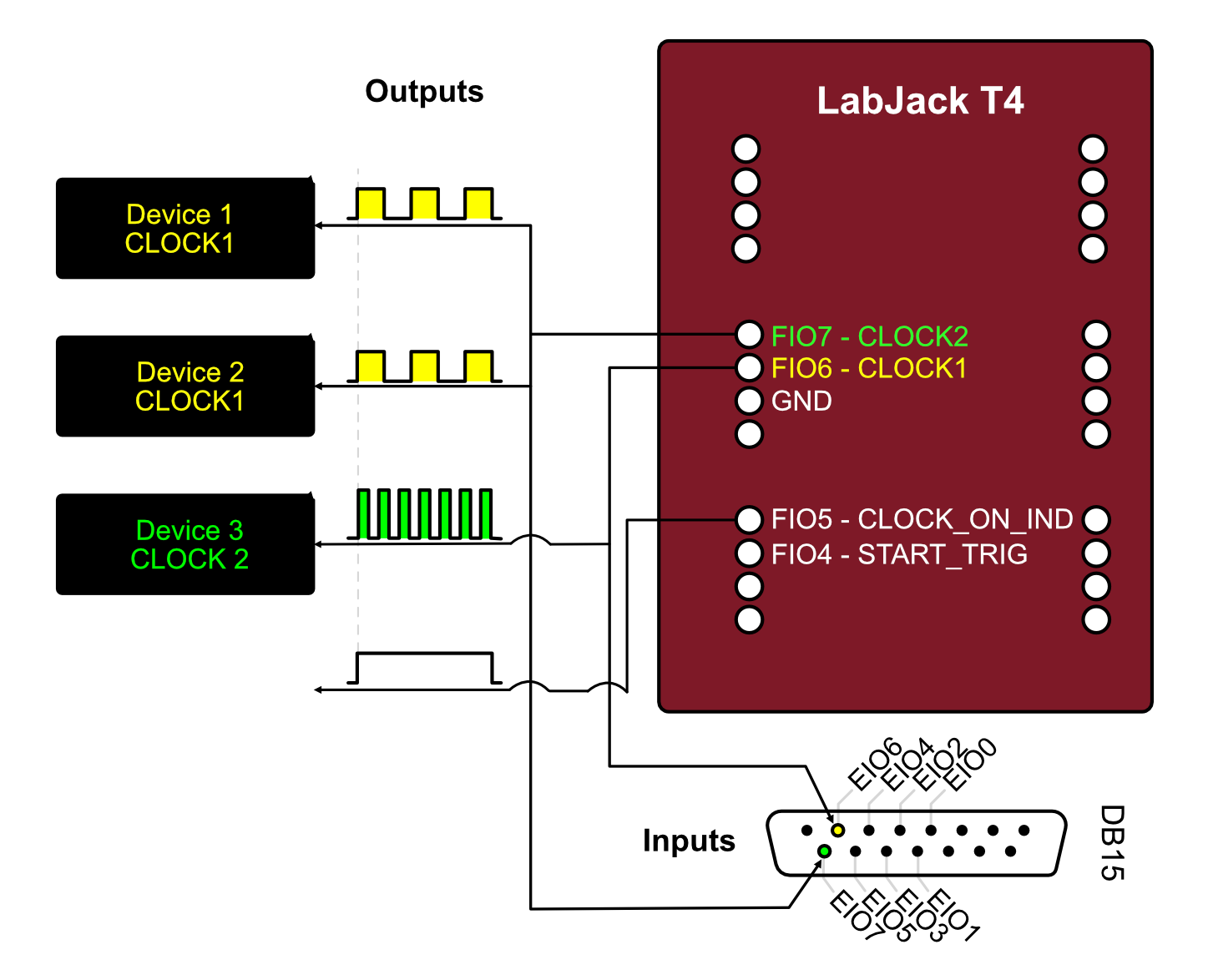
Recommended Wiring:
Clock Outputs: FIO6, FIO7
Inputs: EIO4, EIO5, EIO6, EIO7
Available Channels
Query available channels in Python:
from xclock.devices import LabJackT4

t4 = LabJackT4()
output_channels = t4.get_available_output_clock_channels()
print(f"Clock outputs: {output_channels}")
# Output: ('FIO6', 'FIO7')
Clock Frequency Limitations
The LabJack T4 uses a divisor-based system for generating clocks from the 80 MHz base clock. Not all frequencies are achievable exactly.
Achievable frequencies:
Frequency = 80,000,000 Hz / (divisor × roll_value)
Divisor: 1, 2, 4, 8, 16, 32, 64, 256
Roll value: 1-65536
XClock automatically calculates the closest achievable frequency:
channel = t4.add_clock_channel(clock_tick_rate_hz=100, ...)
print(f"Requested: 100 Hz")
print(f"Actual: {channel.actual_sample_rate_hz} Hz")
Example: Basic LabJack T4 Usage
from xclock.devices import LabJackT4

# Initialize
t4 = LabJackT4()

# Add two synchronized clocks
t4.add_clock_channel(
    clock_tick_rate_hz=60,
    channel_name="FIO6",
    duration_s=10.0,
)

t4.add_clock_channel(
    clock_tick_rate_hz=100,
    channel_name="FIO7",
    duration_s=10.0,
)

# Start and wait
t4.start_clocks(wait_for_pulsed_clocks_to_finish=True)
t4.close()
Troubleshooting LabJack T4
Device not found:
Install LabJack LJM software
Check USB connection
Test with Kipling software (included with LJM)
Unexpected frequencies:
Check
actual_sample_rate_hzto see achieved frequencyTry different target frequencies
Some frequencies may not be exactly achievable
Connection Examples
Single Camera Synchronization
Connect one camera trigger input to LabJack FIO0:
LabJack T4          Camera
---------          --------
FIO6     ------>   Trigger In
GND      ------>   Ground
Multi-Camera Setup
Connect multiple cameras to different channels:
LabJack T4          Devices
---------          --------
FIO6     ------>   Camera 1 Trigger
FIO7     ------>   Camera 2 Trigger
GND      ------>   Common Ground
Performance Characteristics
Timing Accuracy
LabJack T4:
Base clock: 80 MHz ± 20 ppm
Jitter: <1 µs
Channel-to-channel skew: <100 ns
Long-term drift: <50 ppm/°C
Timestamp Resolution
When recording timestamps:
Resolution: 1 ns (nanosecond)
Accuracy: Limited by base clock accuracy
Format: 64-bit signed integer
Future Device Support
Planned support for additional devices:
National Instruments DAQ: USB-6001, USB-6008, USB-6343
LabJack: U3, T7
Note
See Adding New Device Support for information on adding support for new devices.
See Also
Installation - Installing device drivers
Quick Start Guide - Basic usage examples
Adding New Device Support - Adding new device support
../api/devices - Device API reference